Binomial Model: One Period
The one-period binomial model in a nutshell — stock goes up or down, we build a risk-free portfolio, and derive the hedge ratio Δ and call option price.
Chapter 3, and we’re right at the Binomial Model.
Why is it called “binomial,” you ask?
OK let me back up and tell the story first.
So: predicting stock prices is, by most accounts, completely impossible.
Like, how would you even do that? The whole idea just sounds absurd.
But people started thinking a little differently.
“Alright, fine — let’s say exact prediction is totally off the table. But couldn’t we at least know whether the price went up or down?!?!?!!!!”
“If we could just know that much, we could actually invest with some peace of mind!!!”
So that’s the core idea. The binomial model assumes that over any given period, a stock price has exactly two possible states — an ‘up’ state or a ‘down’ state — and by expanding that idea out, we try to find the theoretical price of an option.
That’s why it’s called ‘binomial,’ apparently.
More specifically:
“There are only two possible outcomes for a stock price: it goes up, or it goes down. (Just like flipping a coin — discrete probability!)”
For now, we’re only going to study the ‘one-period’ model.
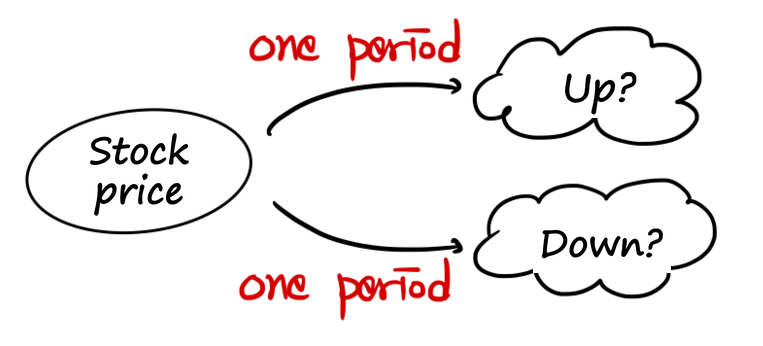
Two points in time: right now, and the expiration date. That’s the whole setup. That’s what it means.
<The baked-in assumptions, as mentioned before: it’s a European option, and there are no dividends or coupons.>
Let’s calculate the present value of a Call option over one period.
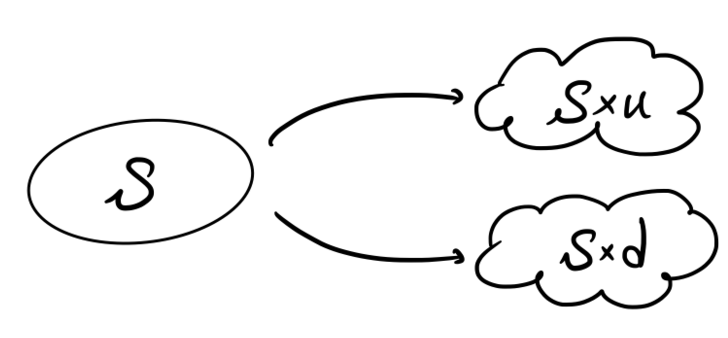
The underlying asset has a current price of $S$.
After one period, it can either go up to $S \times u$ (where $u > 1$), or down to $S \times d$ (where $0 < d < 1$).
And we’re going to construct a risk-free portfolio.
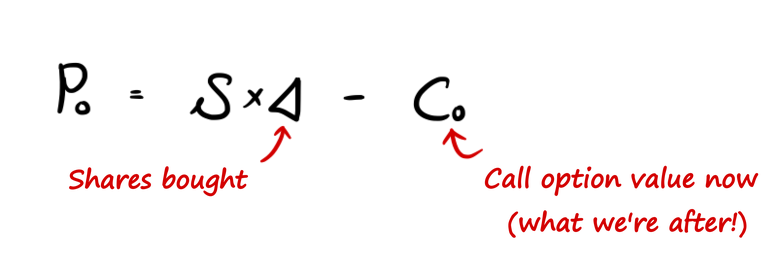
The construction: buy the underlying asset $S$, and sell a call option.
The present value of the portfolio:

is
And after one period, the portfolio’s value becomes:
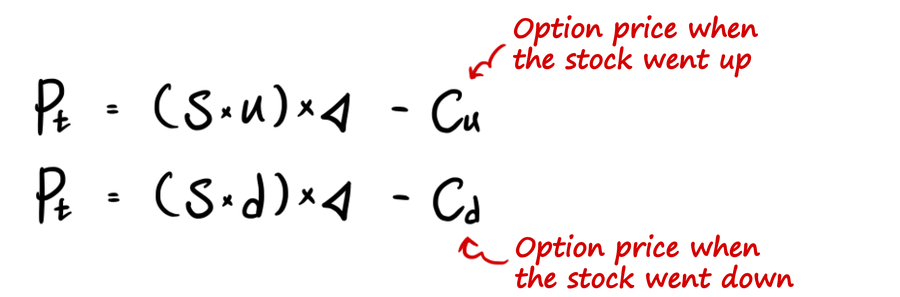
<$c_u$, $c_d$ — from what we did before: if $S \geq K$ then $c = S - K$, if $S < K$ then $c = 0$. That’s that.>
Since this is a risk-free portfolio, the value must come out the same whether the price went up or down. So we get:

And if we play around with that equation a bit —
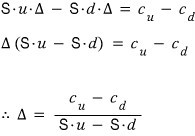
$\Delta$ is the number of shares we need to hold.
This $\Delta$ is called the ‘hedge ratio,’ apparently.
And here’s the other thing — the value of this portfolio must also equal the value from one period earlier!!! That is, if we don’t want the word “risk-free” to become completely meaningless.
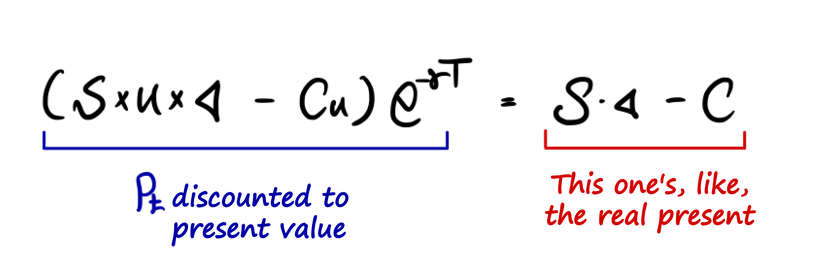
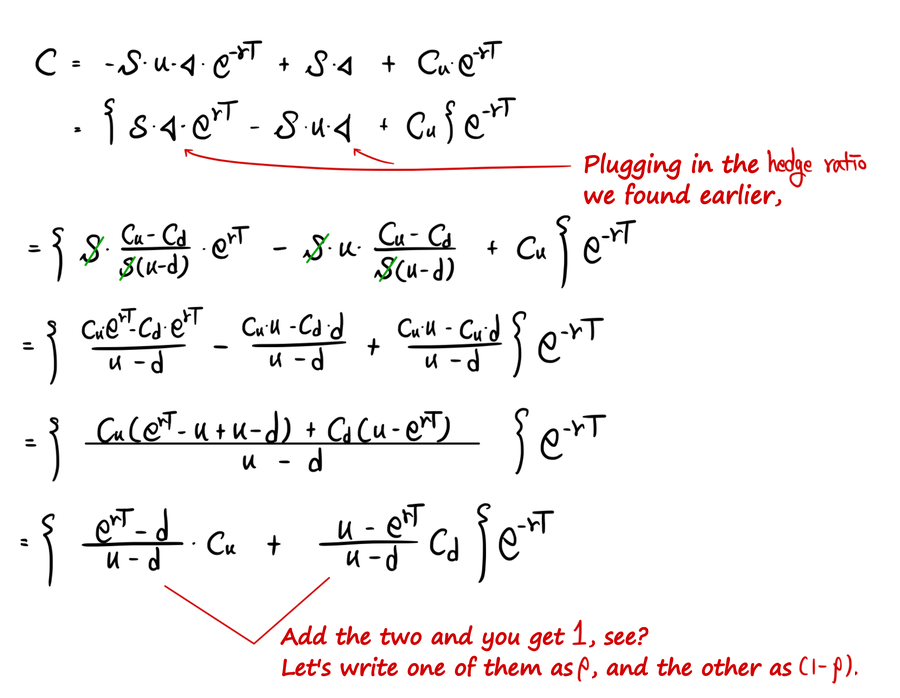
So then —
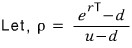

That blue part!! — that’s the value before being discounted to present value. We can call this thing ’the future expected value of $c$.’
One thing worth noticing: it’s in the form of a weighted sum. This is going to be an absolutely critical concept when we generalize later!!! The weighted sum! heh
OK let me code this up and wrap this post.
Sub Binomial_European_One_period()  'The name I write here is the name I'll use for what I'm about to do.

Dim S as double, K as double, up as double, dn as double, rf as double, t as double, n as double

Dim rho as double, r as double, df as double, dt as double, c as double, cu as double, cd as double  'Names of everything I'll be using.

S=100: K=100: up=1.1: dn = 1/up: rf = 0.05: t=1: n=1  'The relationship up×dn = 1 is used in financial engineering — more on that later.

dt = t / n

r = exp(rf * dt)

df = 1/exp(rf * dt)  'Seems handy to make a discount factor like this — just multiply by df whenever you need to discount to present value.

rho = (r-dn)/(up-dn)

'Initial conditions~~

cu = Application.WorkSheetFunction.Max(S*up - K, 0)

cd = Application.WorkSheetFunction.Max(S*dn - K, 0)

c = ((rho)*cu + (1-rho)*cd)*df

End Sub
That red Application.WorkSheetFunction.Max part — I wanted to use the Max() function from Excel inside VBA, so I had to attach Application.WorkSheetFunction. in front of it. Apparently you can also just write WorkSheetFunction.Max() on its own, or even just Application.Max() — they all do the same thing, apparently.
Though this might vary a little depending on your Excel version, so just take it as a reference. (crying)
The main point: you cannot just write cu = Max(S*up - K, 0) by itself!!!! Max() is not a built-in VBA function — it has to be pulled in from somewhere else!!!!!!
Hahahahaha.
I also tried writing up the put option pricing, but suddenly I have absolutely zero motivation to type it all out, and a few days ago someone showed me this really useful app….
So I’m planning to coast through the remaining posts of my life hahahahahahaha
import numpy as np
import math
import matplotlib.pyplot as plt
import os

path = r'C:\Users\GD Park\Desktop\financial-engineering'
os.chdir(path)

def Binomial_European_One_period(S, K, up, rf):
    dn = 1/up
    t = 1
    n = 1
    dt = t/n
    r = np.exp(rf * dt)                  # For exponential you can use math.exp(x), or np.exp(x) from numpy
    df = 1/math.exp(rf * dt)             # 'df' stands for Discount Factor
    rho = (r-dn)/(up-dn)
    cu = max(S*up - K, 0)                # max is a built-in function!
    cd = max(S*dn - K, 0)
    c = (rho*cu + (1-rho)*cd) * df
    return c

Binomial_European_One_periodd = Binomial_European_One_period(S=100, K=100, up=1.1, rf=0.05)
print(Binomial_European_One_periodd)

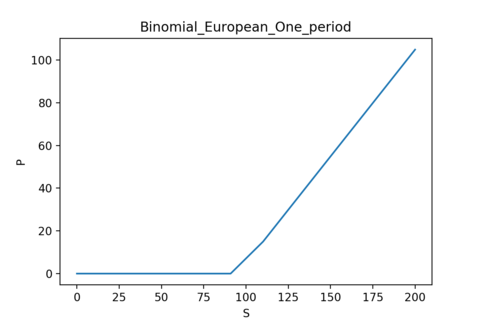
SS = np.linspace(0, 200, 1000)
YY = np.zeros(len(SS))
for i in range(len(SS)):
    YY[i] = Binomial_European_One_period(S=SS[i], K=100, up=1.1, rf=0.05)

plt.figure(figsize=(6, 4))
plt.plot(SS, YY)
plt.xlabel('S')
plt.ylabel('P')
plt.title('Binomial_European_One_period')
plt.savefig('Binomial_European_One_period.png', dpi=200)
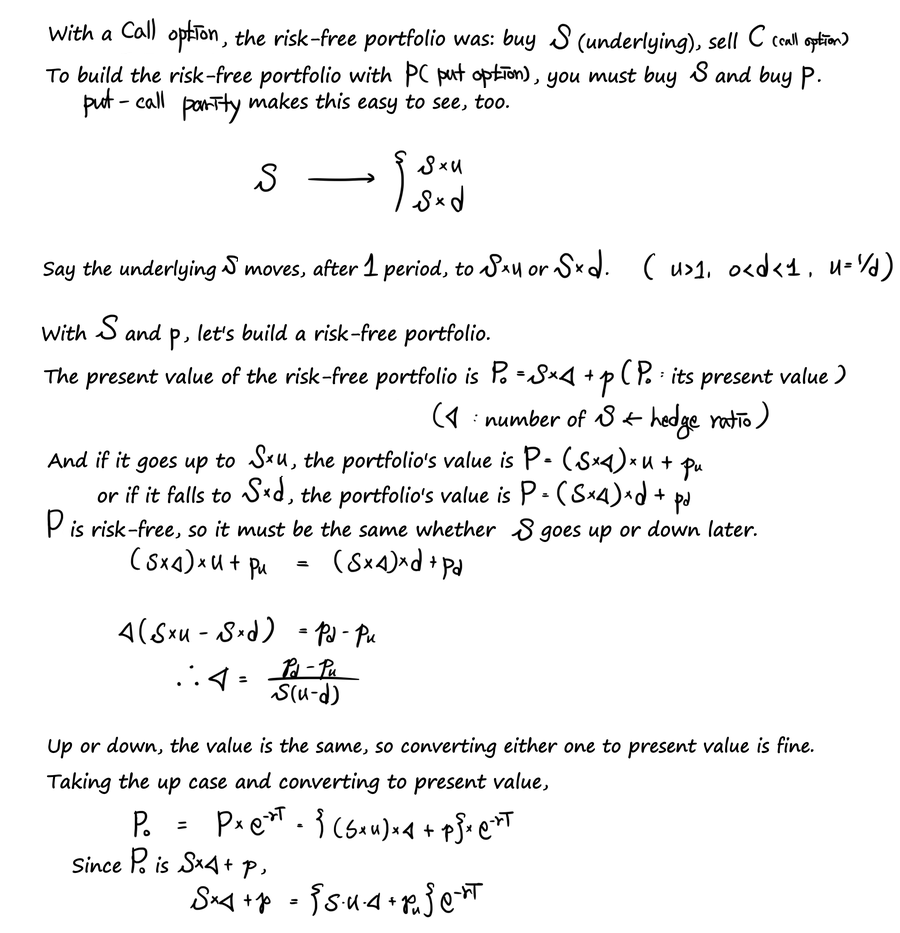
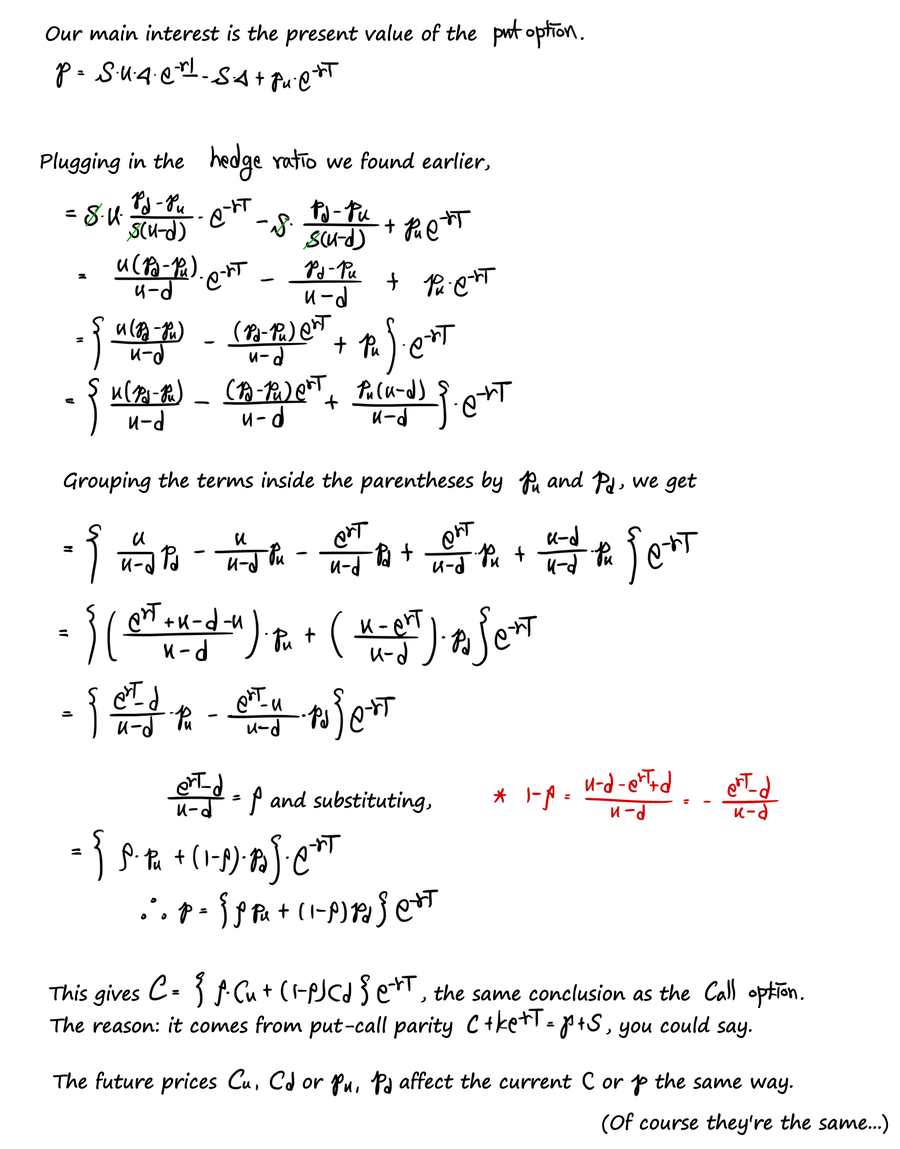
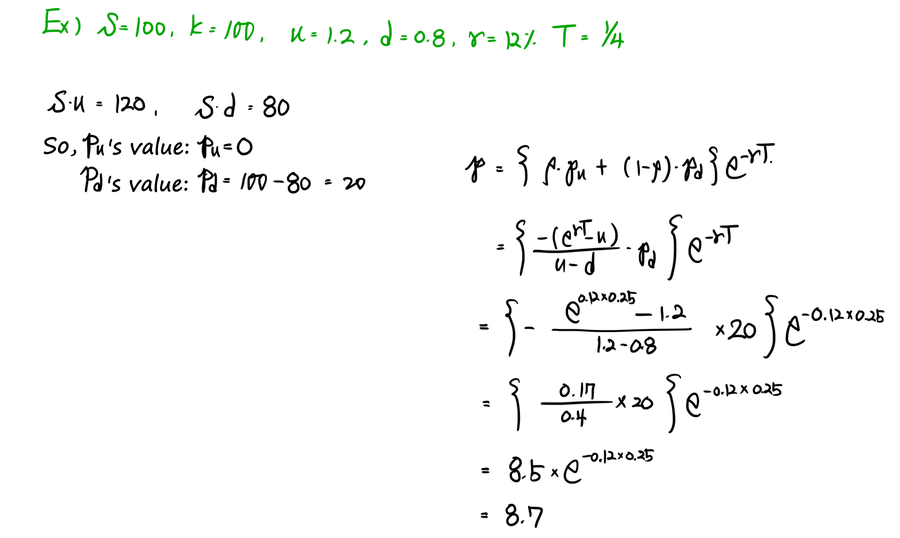
Heads-up. The figures here are the original notes, slips and all. A few things to watch for:
- In the call-option derivation, the middle fraction on the third line should read (C_u·u − C_d·u)/(u − d), not C_d·d; the line after it already uses the right term.
- In the put-option derivation, the red note should end with −(e^{rT} − u)/(u − d): 1 − p = (u − e^{rT})/(u − d).
- In the worked example, 8.5 × e^{−0.12×0.25} is about 8.25, not 8.7.
Comments
Discussion happens via GitHub Discussions. You'll need a GitHub account to comment.