Bisection Method & Weighted Bisection Method
A super chill walkthrough of the bisection method — arguably the simplest root-finding algorithm ever — plus a weighted twist, then putting it to work on implied volatility, with VBA and Python code.
Alright, we’re playing the “find the solution” game from here on out. So — among all the computer-based root-finding methods out there, the absolute easiest one is the Bisection Method. And it is ridiculously, insanely simple!!!
Here’s the basic concept of the bisection method:
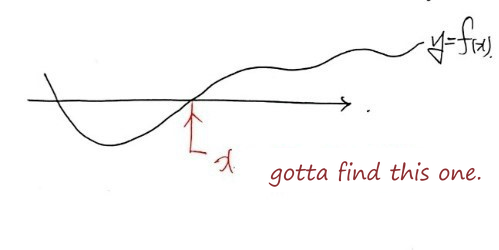
That’s it, right there. This spot is what we want to find, right now.
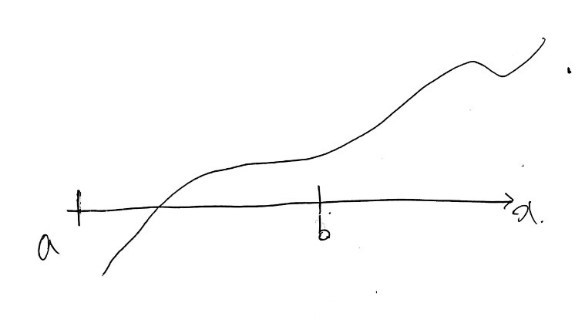
OK so first — let’s say we pick initial values $a$ and $b$ like this.
(Suddenly — wait, what???? Just keep reading and you’ll see what I mean)
But why do we set the initial values as $a$ and $b$ like that???
That’s what  is about: we pick them so that $f(a)$ and $f(b)$ have opposite signs.
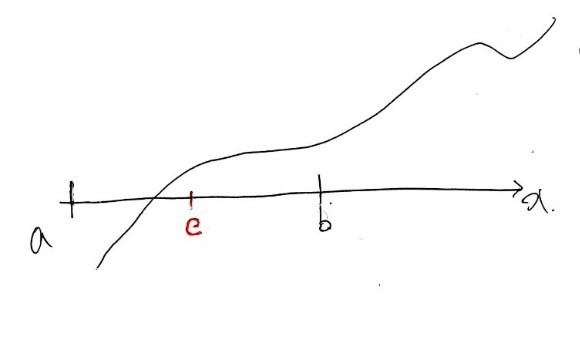
And now let’s say $c$ is the midpoint of $a$ and $b$. Now we need to make a call.
Is $f(a)f(c) \lt 0$? Or is $f(c)f(b) \lt 0$? Which one is it???
$f(a)f(c) \lt 0$, right???? Then — let’s say $c'$ is the midpoint between $a$ and $c$.
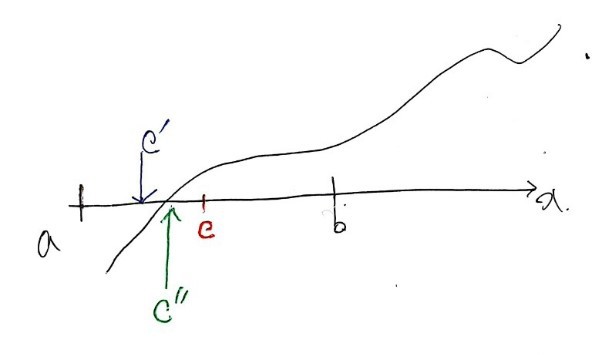
Now that $c'$ is pinned down, we gotta make the same call again: is $f(a)f(c') \lt 0$?????? Or is $f(c')f(c) \lt 0$??? Since $f(c')f(c) \lt 0$, the new $c''$ gets set to the midpoint of $c$ and $c'$…
You get where this is going, right? We just keep running this algorithm, over and over and over~~~~~ and eventually, when we’ve arrived at $c'''''''''''''''''''''''''''''''''''''''''''''''''''''''''''''''''''....................''''''''''$, it won’t be exactly the solution, but it’ll be basically the same thing, yeah?
That’s root-finding via the bisection method!!!
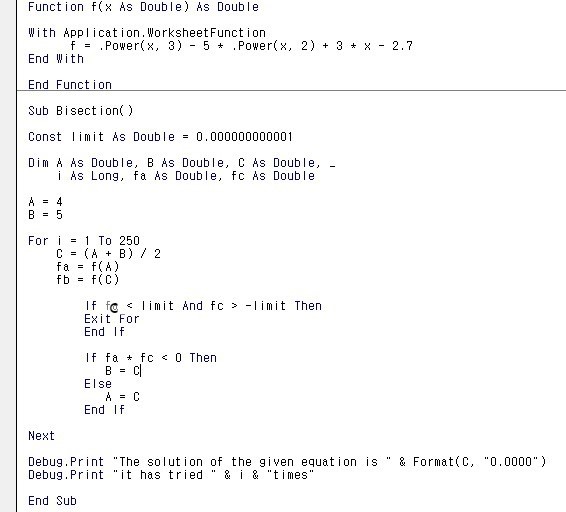
Let’s try it. Find the solution of

using the bisection method, as practice.
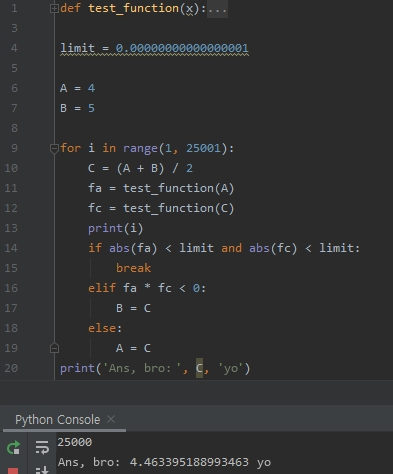
Python Version
I also made a video of it getting closer and closer to the solution using Python
import matplotlib.pyplot as plt
import numpy as np
from matplotlib import font_manager, rc
font_name = font_manager.FontProperties(fname=r"c:\Windows\Fonts\malgun.ttf").get_name()
rc('font', family=font_name)
import matplotlib as mpl
mpl.rcParams['axes.unicode_minus'] = False

for i in range(1, 6):
    if i ==1:
        limit = 0.001
        A = -2
        B = 10
        x = np.linspace(-2, 7, 100)
        y = test_function(x)
        fig = plt.figure(figsize=(20, 10))
        ax = fig.add_subplot(111)
        fig = plt.plot(x, y)
        plt.axvline(x=0, color='k')
        plt.pause(1)
        plt.axhline(y=0, color='k')
        plt.pause(1)
        plt.scatter(A, 0, c='r', marker='*')
        plt.pause(1)
        ax.annotate('initial value', xy=(A, 0), xytext=(A+0.1, 1))
        plt.scatter(B, 0, c='r', marker='*')
        plt.pause(1)
        ax.annotate('initial value', xy=(B, 0), xytext=(B+0.1, 1))

    C = (A + B) / 2
    plt.scatter(C, 0, marker='*')
    ax.annotate('this time', xy=(C, 0), xytext=(C+1+i, 100),
                arrowprops=dict(facecolor='black', width=0.1, headlength=0.4, headwidth=1))
    plt.pause(1)

    fa = test_function(A)
    fc = test_function(C)

    if abs(fa) < limit and abs(fc) < limit:
        plt.scatter(C, 0, marker='*')
        ax.annotate('last time', xy=(C, 0), xytext=(C + 1, 110),
                     arrowprops=dict(facecolor='black', width=0.1, headlength=0.4, headwidth=1))
        plt.title('Ans, bro: ' + str(C) + ' yo')
        break

    elif fa * fc < 0:
        B = C

    else:
        A = C
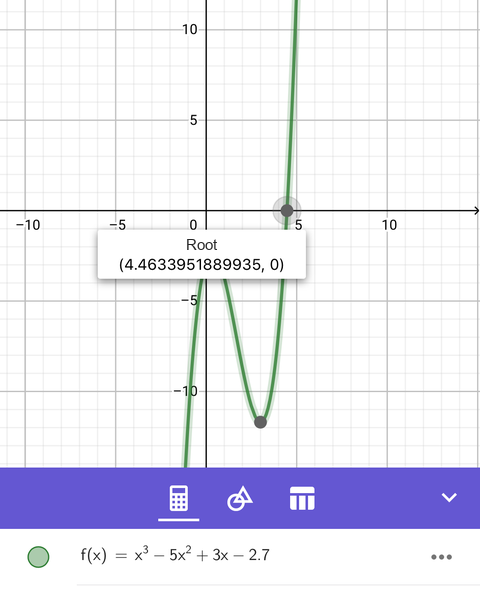
Pretty close to the solution I got with the help of an app!
(I mean — that app’s gotta have some kind of algorithm running under the hood too, right? lol)
Just leaving things at screenshots like this feels a little irresponsible though… Back when I was studying this on my own, I’d work through it like this.
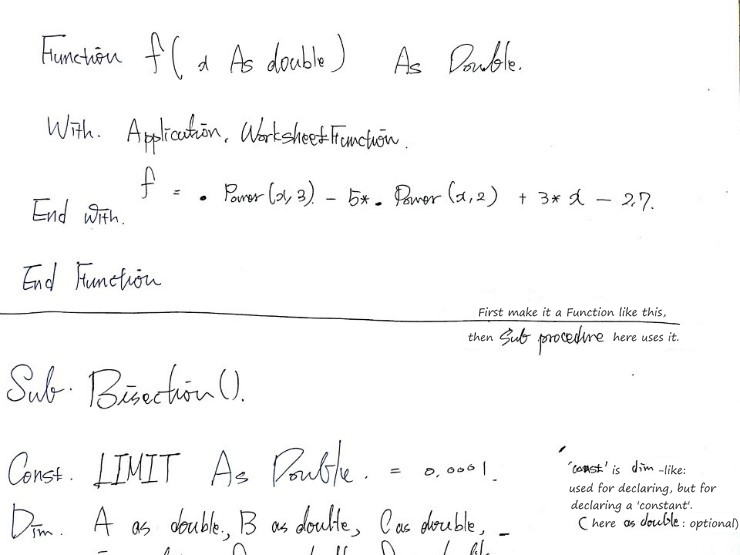
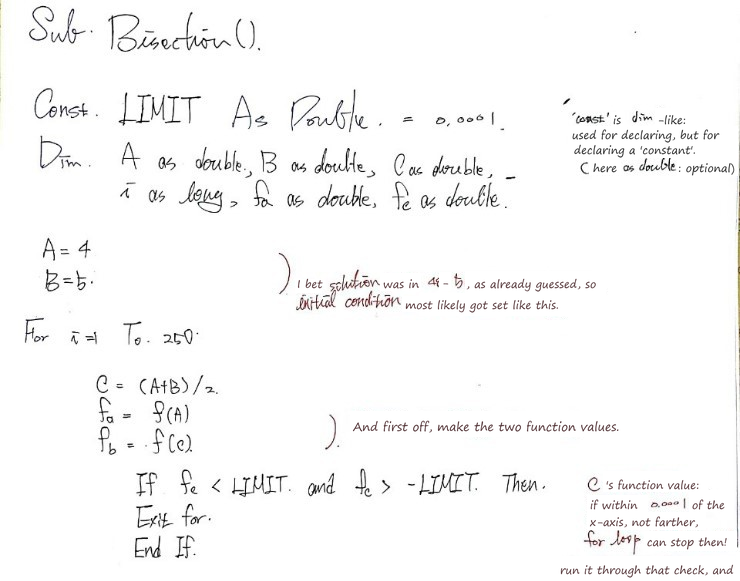
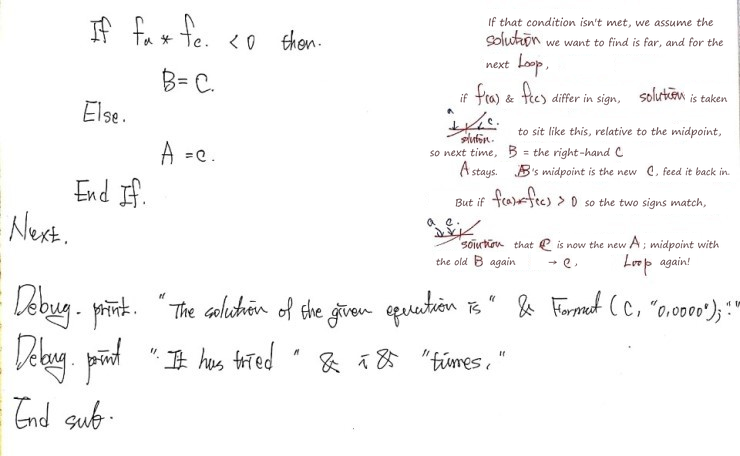
After going through it this carefully, some of the bisection method’s weaknesses start to show themselves… If the function is really, really flat near the solution, even when you’re still a decent distance away from the actual answer, there’s a chance it just gets spit out as “the solution” anyway.
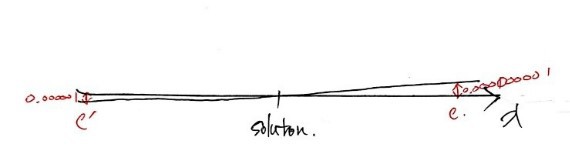
Something like that, you know???????
Back to Implied Volatility
Wait!!!!!!!!!!! But hold on — why were we even learning the bisection method again? — Implied Volatility (Financial Engineering Programming #13)
Right — it was specifically to calculate implied volatility.
So this time, armed with the bisection method, let’s go ahead and calculate implied volatility. One more time: implied volatility is the $\sigma$ value that, when you plug it into the BS formula, makes the BS value equal to the market value!!!!!!!!!
To do that, we need a function procedure where we toss in all 5 inputs — $s, k, T, r, \sigma$ — boing! — and the option price goes plop! right out. So let’s start by making the function procedure that does the BS option pricing, and write the whole thing out from there.
(procedure, procedure…)
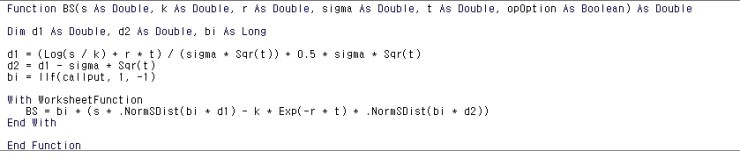
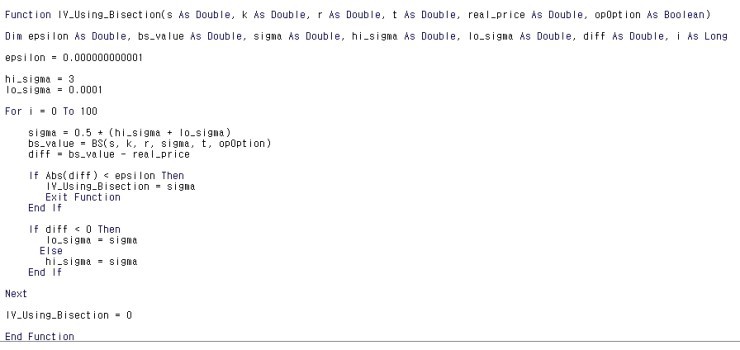
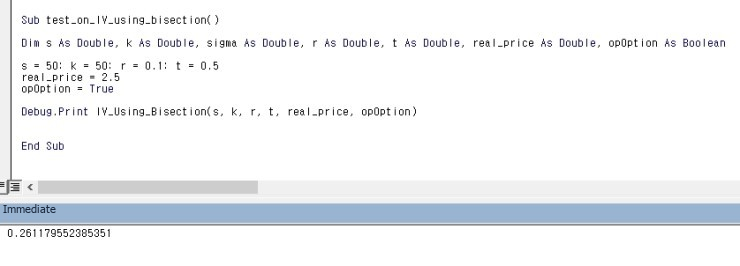
I’ll also put up some pictures with commentary added to the code.
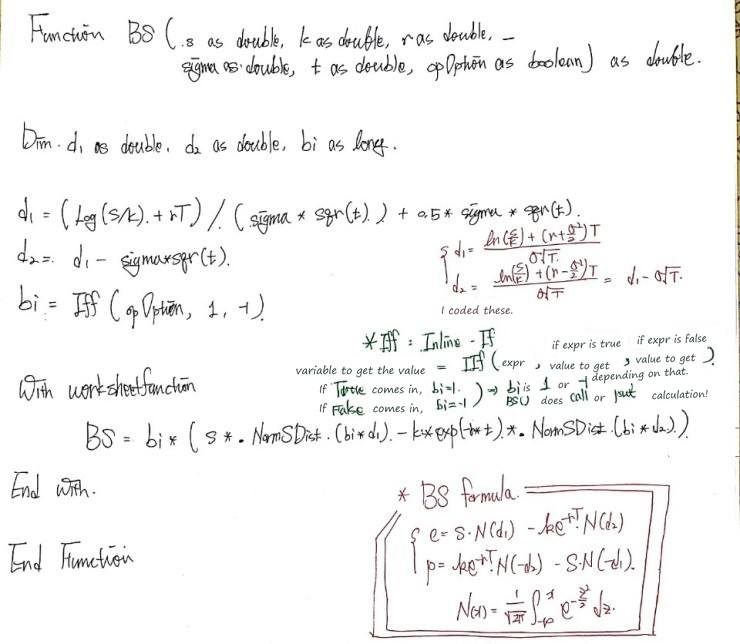
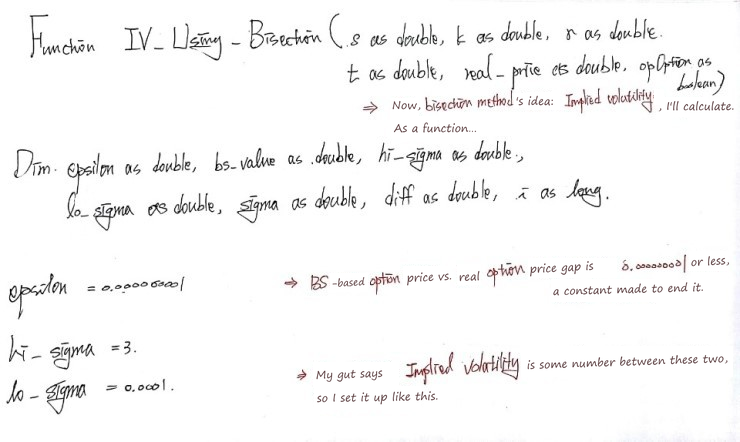
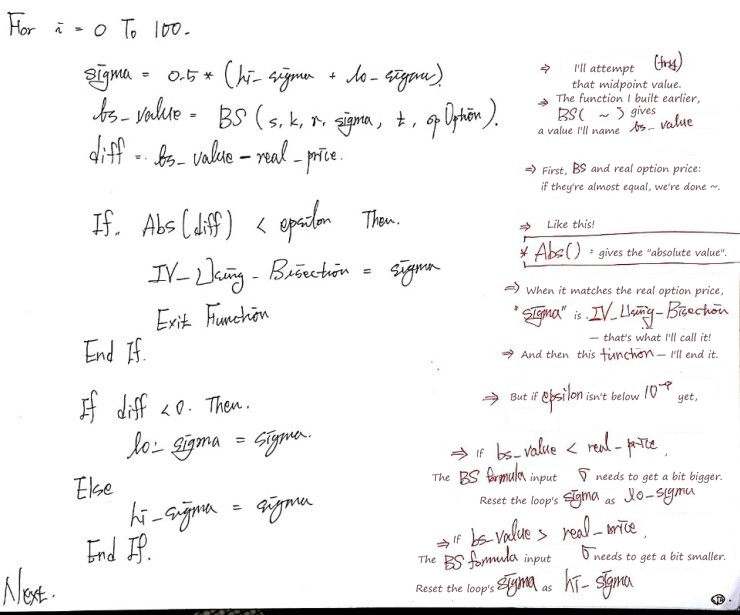
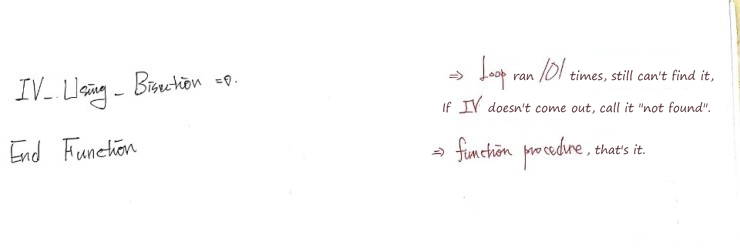
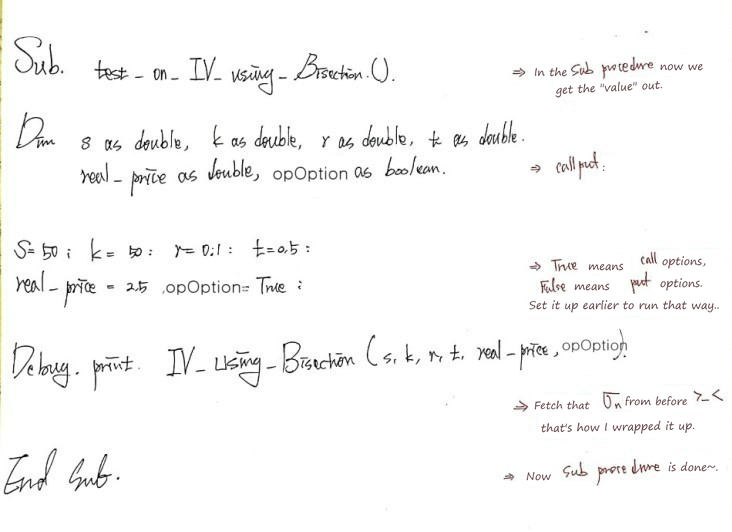
It’s simple enough code that it’s easy to follow, but let me add just a tiny bit more comment while I’m at it —
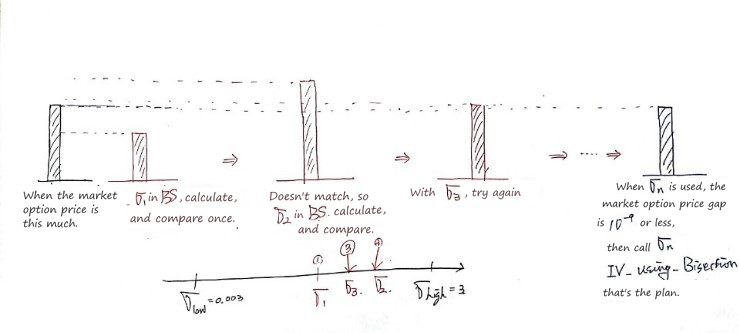
Python Version
import math
import scipy as sp
import scipy.stats
norm = sp.stats.norm(loc=0, scale=1)

def BS(S, k, r, sigma, t, opOption):
    d1 = (math.log(S / k) + r * t) / (sigma * math.sqrt(t)) + (0.5 * sigma * math.sqrt(t))
    d2 = d1 - (sigma * math.sqrt(t))
    if opOption == True:
        bi = 1
    else:
        bi = -1
    BS = bi * (S*norm.cdf(bi*d1) - k*math.exp(-r*t)*norm.cdf(bi*d2))
    return BS

def IV_using_Bisection(S, k, r, t, real_price, opOption):
    epsilon = 0.0000000000000000000000000000001
    hi_sigma = 0.3
    lo_sigma = 0.0001

    for i in range(101):
        sigma = 0.5 * (hi_sigma + lo_sigma)
        bs_value = BS(S=S, k=k, r=r, sigma=sigma, t=t, opOption=opOption)
        diff = bs_value - real_price
        if abs(diff) < epsilon:
            IV_using_Bisection = sigma
            break
        else:
            pass

        if diff < 0:
            lo_sigma = sigma
        else:
            hi_sigma = sigma
    if abs(diff) < epsilon:
        IV_using_Bisection = IV_using_Bisection
    else:
        IV_using_Bisection = 0
    return IV_using_Bisection

S=50; k=50; r=0.1; t=0.5
real_price = 2.5
opOption = False
IV_using_Bisection(S=S, k=k, r=r, t=t, real_price=real_price, opOption=opOption)
Weighted Bisection Method
This bisection method might look a little dumb. It just blindly goes bam!!!!!! the midpoint!!!!!!!!! and plugs that in, so… it does get closer to the solution, it does get closer, but…
So, to get closer a little bit smarter, someone put their head to work and came up with another bisection method. It’s called the weighted bisection method, and — hmm… I think it could be a way to cut down the number of tries a bit. I’ll just explain it quickly with pictures and move on.
Before, it was “no questions asked, no arguing — midpoint!!!!” Now, instead of going to the midpoint of $a$ and $b$, we take the function values at $a$ and $b$ into account, write down the equation of the straight line between those two points, and then —
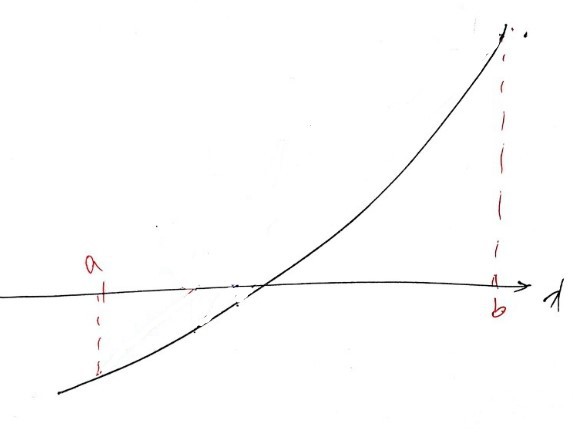
OK so we want to get over there, to the solution — here’s how we get closer:
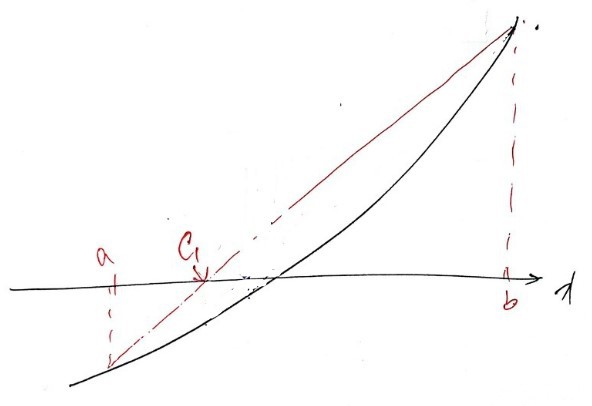
We draw the line between the two function values, and call the x-intercept of that line $c$ again.
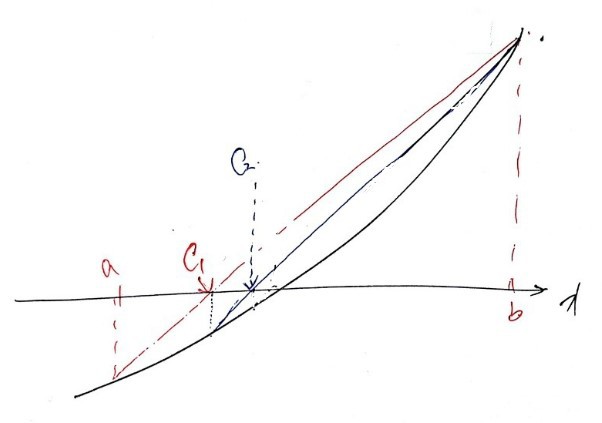
Then from that $c$, we set up the line between the two points again, and call the x-intercept of that line $c$ again, heh heh heh heh
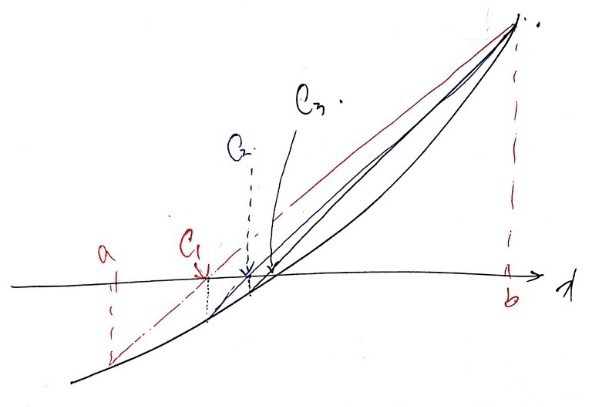
You can see how it’s homing in on the solution now, right?
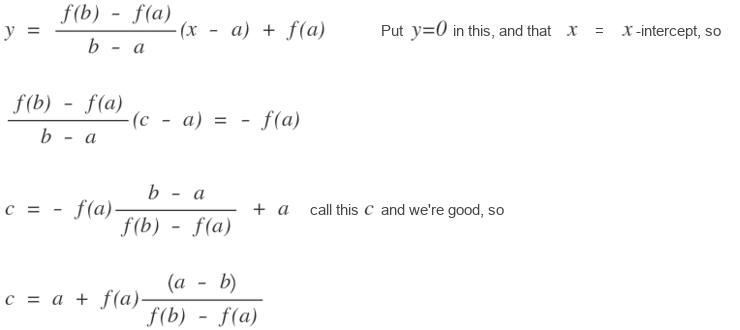
OK so before, we could just say $c = (a+b)/2$, which was easy, but here — how do we write the formula for the next $c$??????!?!?!
The equation of the line through $(a,\ f(a))$ and $(b,\ f(b))$ is

That’s the line’s equation, and
So, using this, let’s find the solution of

— the same game we played above — with the weighted bisection method. We can just reuse the function procedure we already wrote, so let’s just knock out the sub procedure. heh heh
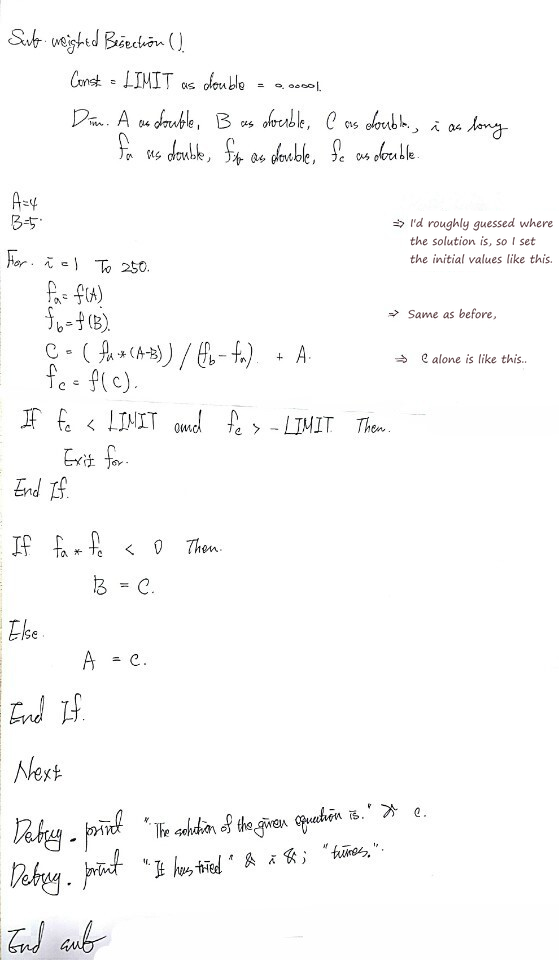
Python version
def f(x):
    return x ** 3 - 5 * x ** 2 + 3 * x - 2.7

A = 4
B = 5
limit = 0.000000000000000001
for i in range(251):
    fa = f(A)
    fb = f(B)
    c = (fa * (A - B)) / (fb - fa) + A
    fc = f(c)
    if (fc < limit) & (fc > -limit):
        break
    else:
        pass

    if fa * fc < 0:
        B = c
    else:
        A = c
print('The solution of the given equation is ', c)
Heads-up. The figures here are the original notes, slips and all. A few things to watch for:
- In the VBA Sub Bisection (typed and handwritten), the value at the midpoint is stored as fb = f(C); it should be fc = f(C), the name the next lines test.
- In the VBA BS function, IIf(callput, 1, -1) should use the parameter: IIf(opOption, 1, -1) (the handwritten copy also writes Iff for IIf). As written, callput is an empty, undeclared variable, so the function always prices the put, and the 0.2612 in the Immediate window is the put’s implied volatility; the call’s, for a price of 2.5 with $S = K = 50$, $r = 0.1$ and $T = 0.5$, is about 0.050.
Comments
Discussion happens via GitHub Discussions. You'll need a GitHub account to comment.