Estimating Pi Using the Monte Carlo Method in Python
Toss enough random darts at a unit square, count the ones inside the circle, and — boom — you've got π, courtesy of the Monte Carlo method and a bit of Python.
Quick one today — Monte Carlo $\pi$, the classic.
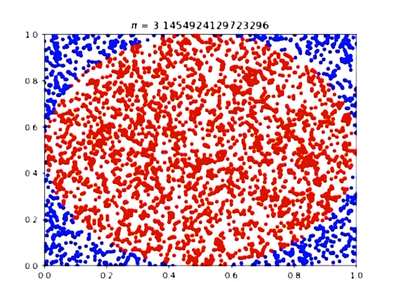
You know the trick, right? Throw a bunch of random darts at a unit square. Some land inside the inscribed circle, some don’t. The ratio of inside-vs-total $\times 4$ gives you $\pi$. The more darts, the closer to $\pi$.
Here, watch:
import matplotlib.pyplot as plt
import numpy as np

fig = plt.figure()
ax = fig.add_subplot(111)
plt.xlim(0, 1)
plt.ylim(0, 1)
count=0
for j in range(1, VERY_LARGE_NUMBER):
    x = np.random.rand(1)
    y = np.random.rand(1)
    if ((x-0.5)**2) + ((y-0.5)**2) <= (0.5)**2:
        plt.scatter(x, y, c='r', marker='.')
        count += 1
    else:
        plt.scatter(x, y, c='b', marker='.')
    plt.pause(VERY_SMALL_NUMBER)
    plt.title(r'$\pi$ = %s' % (round(4 * count / j, 20)))
    plt.draw()
Heads up — when you actually run this thing, it’s slooow. Like, painfully slow.
The video? Yeah lol, I sped that up a ridiculous amount. Like ultra-mega-turbo speed hehe. Don’t be fooled.
If you want the backstory on why this works — the whole “throw enough random stuff at a problem and the average converges” idea — I wrote about it before:
Monte Carlo method — Financial Engineering Programming Study #9
Short version: it’s basically the Law of Large Numbers wearing a different hat. The more samples you throw, the closer your estimate gets to the true value. That’s the whole magic.
Comments
Discussion happens via GitHub Discussions. You'll need a GitHub account to comment.