Isoquants
We bring K back into the picture, plot the whole Q = f(L, K) surface in 3D, then slice it to see what isoquants actually are — infinite (L, K) combos that spit out the same output.
Last time, we made it up to here:
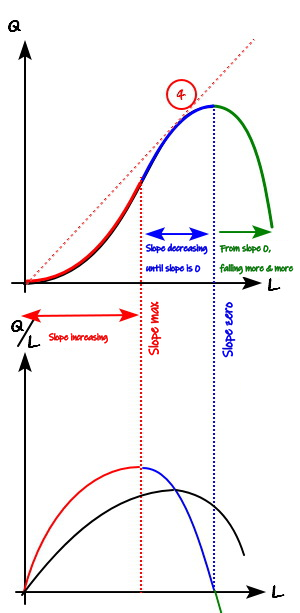
We got as far as lumping $MP_L$ and $AP_L$ together in one drawing. So now let’s keep going.
Up until last time, I said $Q$ depends on two variables, $L$ and $K$ — but we pinned $K$ down as a constant and only looked at how $Q$ moved with $L$. This time, I’m bringing $K$ into the picture too.
As for the $Q$ that gets decided by two variables, here’s how we’ll think about it:
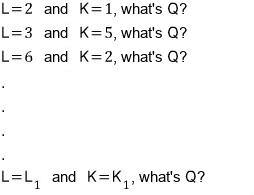
Say we’ve collected a ridiculous number of $(L, K, Q)$ sets this way,
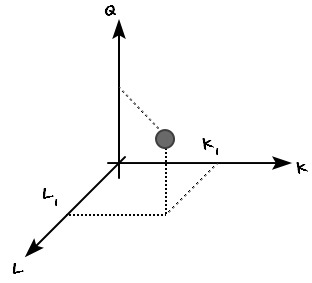
like this — treating $L$ and $K$ as continuous variables — we pull out an infinite number of $Q$ values, one for each $(L, K)$ ordered pair, and drop them as points into a 3D coordinate system@@@@ We’re going to plot it@@@@ End result: if you plot infinitely many points, you get something like this.
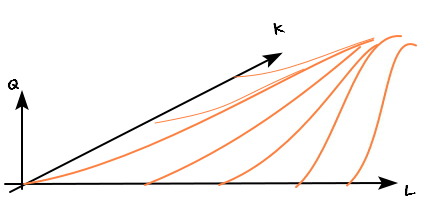
Oh wait, no@@@ There was THIS one!!@@@ I’ve got one I drew in Matlab.
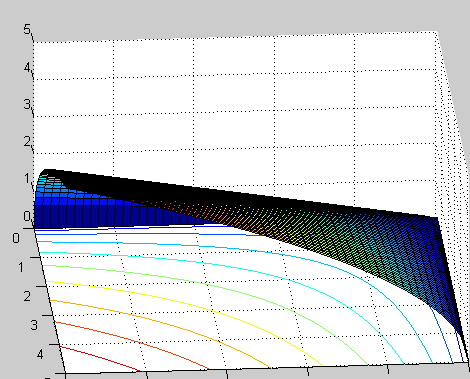
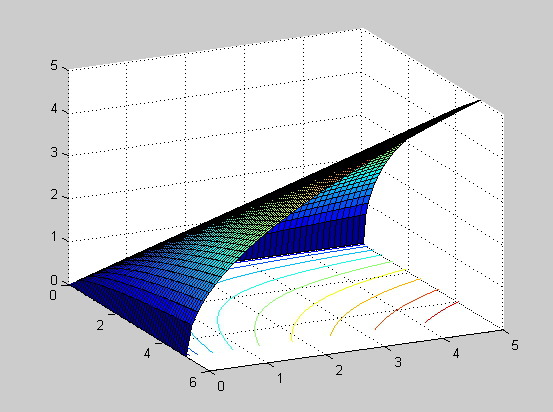
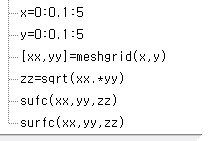
Ah — but that one is the final conclusion, for later. There’s a bit more I need to say first, heh heh heh, so for now we go with this picture:
Earlier, when I drew $Q = f(L)$, the premise I threw out was “when $K$ is constant.” And when $K$ is constant,
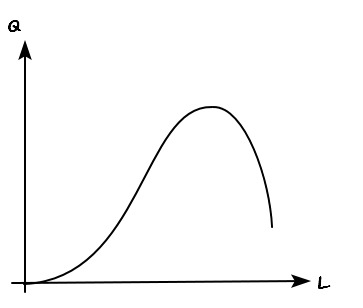
I said it gets drawn like this. And that graph —
— has to hold here too.
So is it hiding in here?????????
Yes yes, it’s hiding in there. Let me trace it over.
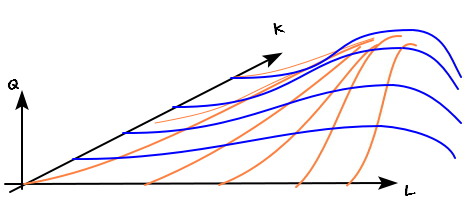
Ahhh-ha~~~ When $K$ is fixed at a small value, the curve isn’t that bendy. When $K$ is fixed at a large value — the bigger it’s fixed, the more curvature you get.
Doesn’t seem unreasonable. Let’s think about it for a sec.
When the $K$ we’re holding fixed is higher, $Q$ is more sensitive to $L$ — in other words, more sensitive in terms of efficiency. And “sensitivity” on a coordinate plot is just the slope. Hehehe, you with me so far? heh heh heh
OK so we’ve plotted every point in the $LKQ$ coordinate system.
Now, where is it we actually want to zoom in?
“The places that produce the same output ($Q$).”
To pin down only the points with the same $Q$ value, we slice this graph perpendicular to the $Q$ axis. After slicing, some line pops out. Every point on that line means “same $Q$ value.” And that line looks like this@@@@
(Picture taking a knife and going whoooosh@@@ parallel to the $LK$ plane.)
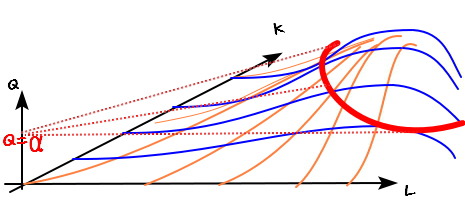
If you swoosh~~~ cut with the $Q = \alpha$ plane, you get that red line. Every point on that red line has $Q = \alpha$, and each one is a different $(L, K)$ ordered pair.
In other words, the way to produce $Q = \alpha$ isn’t pinned down as “$L$ = boing, $K$ = bang” — there are infinitely many ways to do it.
(Similar to the utility function, huh.)
This line is called an isoquant (equal-quantity curve), they say.
(The textbook compares the isoquant to a contour line on a map, and I’ll skip walking through that, but file it away for reference.)
Isoquant — a set of points with the same $Q$ value. Contour line — a set of points with the same “height” value.
OK, so on that picture above, let me draw just one more isoquant — this time for $Q = \beta$, where $\beta > \alpha$@@@
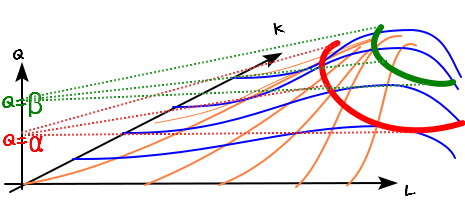
Now — where are we going to look at these two lines from?
I’m gonna put my eyeballs over there.
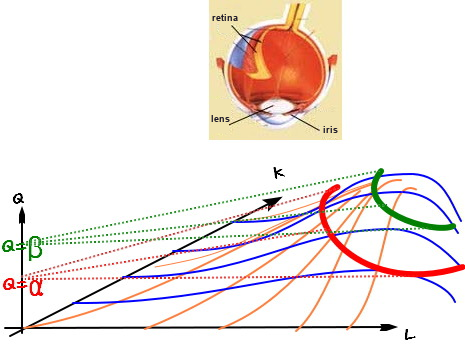
We’ll look from here — heh heh heh heh heh. And from here, each isoquant looks like this.
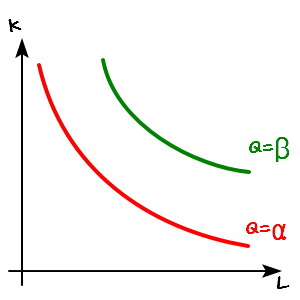
Isoquant derivation done~~~~~~~~~~~~~~
But — OK, I know everyone’s going to have a question.
“Hey hey hey hey hey hold on…(annoyed face)? Done??”
That’s what you all seem to be saying…. heh. Yes yes yes yes yes yes yes yes. I’ll pick up right from there next time. See you in the next post — I’m calling it a supplementary section.
Heads-up. The figures here are the original notes, slips and all. A few things to watch for:
- In the first graph (carried over from last time), the lower panel’s vertical axis is labeled $Q/L$, but its red-and-blue curve is the marginal product $dQ/dL$; only the black curve is the average product $Q/L$.
- In the MATLAB listing,
sufc(xx,yy,zz)is a typo forsurfc(xx,yy,zz).
Comments
Discussion happens via GitHub Discussions. You'll need a GitHub account to comment.